

1. Display Type
Displays are not created equal in how they deliver information to the visual cortex. While a multitude of different display technologies have evolved over the years, in present day we typically see 3 major types:
- Transmissive – Dominated by the liquid crystal display (LCD), transmissive displays essentially use microscopic light valves as the individual pixels to pass an always-on light to the user. This always on backlight means that transmissive displays are generally more power inefficient and color impure as there is no such thing as a perfect ‘light valve’.
- Emissive – Primarily seen in organic light emitting diode (OLED) screens, emissive displays directly emit light from each individual pixel, leading to generally lower power draws. Also a major benefit in the nascent micro LED (uLED)
- Reflective – Popularized by the E-Ink electrophoretic displays, this technology achieves the lowest power draw by utilizing ambient lighting as the light source and achieving local contract by modulating the reflection at each pixel. While highly efficient in terms of power, color purity and low-light visibility is a major weakness for most of these displays.
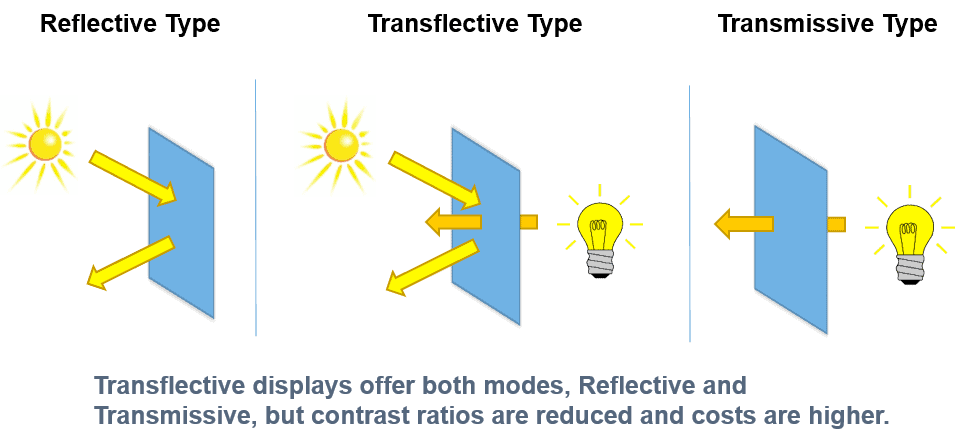
Comparing the light source mechanism of reflective, transflective, and transmissive displays. (Image: New Vision Display)
2. Resolution
A display will typically be specified in pixels-per-inch (PPI) which is used to quickly compare the pixel density of two equivalent sized screens. While generally a larger number is better, there are many caveats that require a full day to cover. Importantly, the PPI that is considered ‘good’ for a consumer is generally one that allows for visibly indistinguishable pixels at the typical working distance of said display. Since (most) people won’t use a smartphone at the same distance as their 65″ TV, this means that a high PPI is generally less important as you increase display size. For reference, a 65″ 4K TV has around 70 PPI, but that same resolution on a 6″ iPhone screen would be a whopping 730 PPI – a bit of an overkill for checking your email.
3. Color
Color is a complex topic covered extensively in the student certification, but two of the most important factors to consider are color gamut (how accurately the display type can achieve a particular color) and color depth (how many total colors can be achieved). Modern displays use ever purer colors – each color channel red (R), green (G) and blue (B) having narrower spectral emission profiles – and can have sufficiently fine steps within each channel to create millions, if not billions of individual colors. That said, there does come a point of diminishing returns as can easily be seen in the schematic below from Samsung Display – 8-bit depth is an incredible advancement over 3-bit images, but the same cannot be said for the dramatically more advanced (and data-hungry) 24-bit depth image.

Example of the same image rendered with 3-bit, 8-bit or 24-bit color depth. (Image: Samsung Display)
4. Power
Display power consumption is one of the most important metrics for downstream consumers of display modules, especially in cases where the display operates in a battery powered devices such as a smartphone or laptop. You may correctly assume that the display type is the single biggest contributor to said power consumption with reflective displays being a clear winner, but countless other tradeoffs are required to understand customer needs (e.g. what is the minimum refresh rate a customer can accept? if nothing less than 60 Hz is feasible, reflective displays are generally a non-starter).
5. Form Factor
Finally, the single most important consideration for both multi-billion dollar fab decisions when starting a new display production line, as well as for potentially multi-trillion dollar product decisions by major OEMs is form factor – what do you physically need your display to look like? Depending on the size and expected functionality (e.g. will it fold?) of the device, the display type, PPI, color purity, power and so much more will typically be well defined for you based on a quick practicality assessment. Many ways exist of making small OLED displays, but if you need a 75″ TV for a budget consumer, you are almost automatically locked into an LCD TV panel choice. As always exceptions to the rules exist, especially in a market dominated by pricing wars for the major panel makers, but the details of display module production are important to make sure you do not select the wrong technology from the start of your display design.

 Display Training Center