Rokid Max AR Glasses – Teardown and Optical Analysis

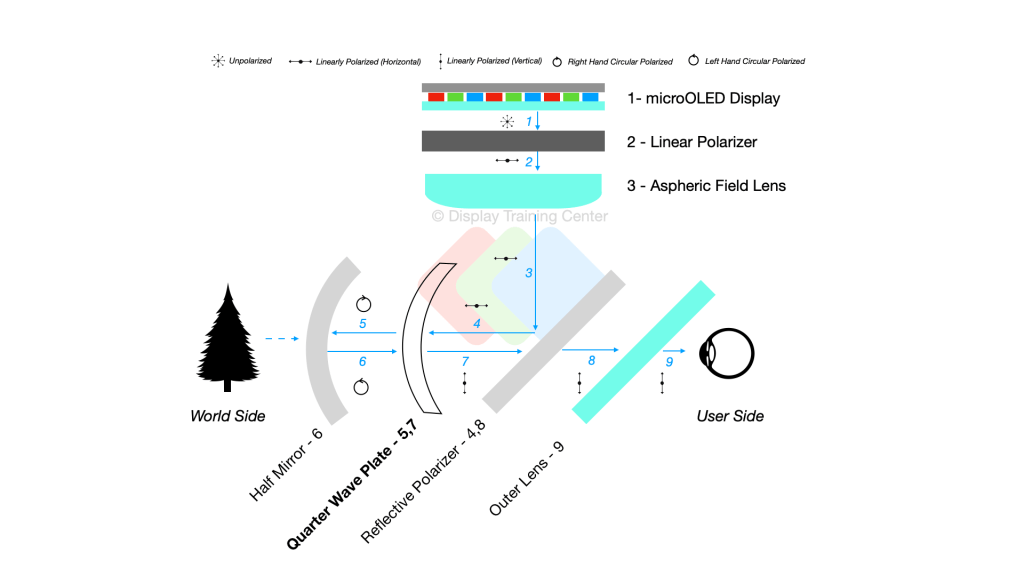
Our next teardown is the Rokid Max AR Glasses, despite chronologically being one of the earlier display glasses on the market. It’s likely fair to say a few of the brands we’ve already looked at (aka Viture…) took heavy inspiration from this initial design. This is most apparent with the diopter adjustment mechanism, as well as the removal of 1x QWP from each optical module (see diagram below).

A downside of being first to market is that you can’t get everything right all the time – this was definitely the case with these glasses, especially when it comes to the thermal management solution for the display. There is no heatsink directly in contact with the display, and the minimal amount of thermal tape on the back of the Sony panel won’t effectively do much to remove the heat away from the panel…

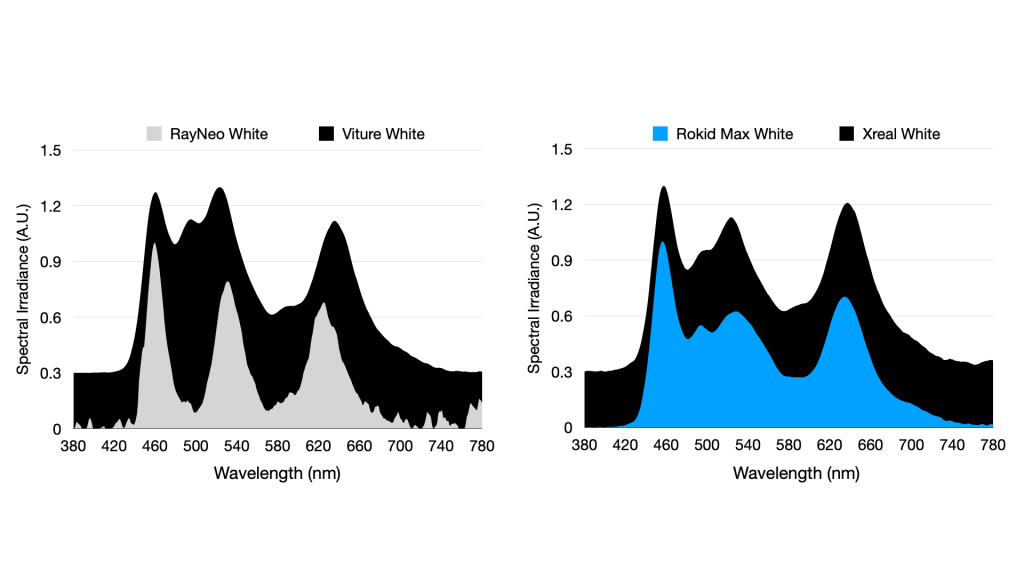
Display-wise, Rokid is using the same Sony panels (specifically the 0.68″ ECX343E panels) that Xreal and Viture use, which leads to a much smaller color space possible than with the Rayneo panels. You can see the spectrum in blue below and how much more overlap there is between blue (~460nm) and green (~540nm) peaks in these Sony panels.
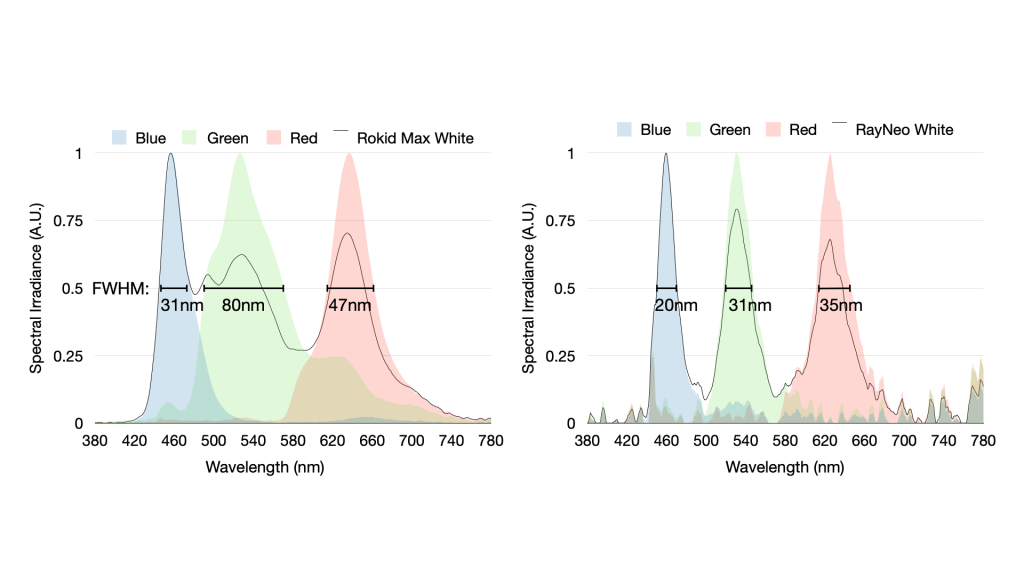
When we break this down into individual blue, green and red spectra measurements, it’s even more apparent that the Sony panels are performing worse than the SeeYA panels from a color purity perspective – the full-width, half-maxes of each of the primary colors in the Rokid Max (left) are all much higher than their equivalents in the SeeYA panel in the RayNeo unit (right), but the worst is green. In this wavelength range, the Sony panel had an 80nm (!) FWHM compared to just 31nm for SeeYa…
From an optics perspective, it’s more fair to say that Rokid was the one to originally reduce the manufacturing cost by only using one QWP on the half mirror lens, not Viture. I’ve updated the polarization diagram below with the changes in film location marked in bold, but this also doesn’t show that the QWP that was removed between locations (2) and (3), as well as (4) and (5).
Radu Reit Avatar

Posted by

4 responses to “Rokid Max AR Glasses – Teardown and Optical Analysis”

  1. lightofmysoul Avatar
    lightofmysoul

    Interesting.. If Xreal and Viture have the same panel, why they do not allow to use 1200p mode? With Rokid Max you can activate 1920×1200@120 or 3840@1200@90 modes, while Xreal and Viture does not provide such functionality. Are they really using the same display module?

    Like

    1. Radu Reit Avatar

      They use the same panel technology from Sony, but not exactly the same part number – you can find each panel listing here: https://www.sony-semicon.com/en/products/microdisplay/oled.html

      The manufacturers all use the following panels

      Xreal: ECX343E (0.68″)

      Viture: ECX348E (0.55″)

      Rokid: ECX343E (0.68″)

      Viture uses a slightly smaller 0.55″ panel where the true maximum resolution is 1920×1080 for the OLED microdisplay.

      That said, you can see Xreal and Rokid use the exact same panel which does have the max 1200p resolution, but they all advertise a 1080p resolution more likely due to the content most people watching being 1080p rather than the more niche 1200p.

      Like

      1. lightofmysoul Avatar
        lightofmysoul

        So, basically… the only reason that Xreal Air does not advertise 1200p is stupid marketing? That is very sad..

        Of course in order to use Rokid Max at 1200p I have to move them closer to my eyes to see the whole screen and the heat emission becomes a bit of a problem in a hot environment, but at least Rokid made this mode available here.

        Like

      2. Radu Reit Avatar

        Even for the Rokid Max’s, they are natively set to 1080p so you likely have a similar resolution for both headsets as a default. The 1200p for Rokid needs to be enabled by switching the refresh rate down to 60 Hz, and then also manually changing the screen resolution on your connected device… doable, but a more involved process that most won’t go through.

        I’m not sure if Xreal has a similar method for changing the native resolution, but if they do I haven’t found a guide for how to do so…

        Like

Leave a reply to Radu Reit Cancel reply